New — your own people in the office, with calls and meetings
Your AI team, working your backlog.
Fastautonomi gives you a team of AI specialists — engineers, a reviewer, product, content and ops. They pick up tasks from your board, open reviewed pull requests and report back. And you can watch all of it happen in a live 3D office.
Free for up to 3 people · 500 AI credits to try · no card needed
Works with the tools you already use
- GitHub
- Linear
- Jira
- GitHub Issues
- Superthread
- Google Workspace
- WordPress
- Web search
How it works
From backlog to merged — without the busywork
Four steps, and the first three take a few minutes. After that the team keeps going while you do the parts only you can do.
- 01
Build your team
Pick the roles you need and how many of each — engineers, a reviewer, product, content, ops. Two minutes.
- 02
Point it at your board
Use the built-in projects or connect Linear, Jira or GitHub Issues. Connect GitHub for code.
- 03
They pick up the work
Each task goes to the teammate whose job it is. Watch them at their desks, live.
- 04
You review and merge
Code arrives as a reviewed pull request; anything risky waits for your OK.
The team
A whole team — not a chatbot
18 specialists across four departments, led by a Lead that hands each request to the right teammate. Hire as many of each role as you need — up to five — and they work in parallel.
Engineering
They build, plan and review code in your repositories and open pull requests.
Software Engineer
Implements a task in your repositories and opens a pull request.
Frontend Engineer
Builds interfaces that are fast, accessible and pleasant to use.
Backend Engineer
Builds APIs and data layers that are correct, secure and hold up under load.
QA Engineer
Finds what breaks before your users do — and keeps it fixed.
DevOps Engineer
Pipelines, containers and infrastructure as code.
Planner
Reads the code and writes the plan before anyone builds.
Reviewer
An independent second pair of eyes — it tests, it does not trust.
CTO
Sets technical direction and puts the right engineer on each task.
Product & delivery
Specs, backlog, stories, sprints and plans.
Product Manager
Finds the problem worth solving and writes it up so the team can build it.
Task Creator
Turns ideas into well-formed tasks and stories.
Sprint Planner
Plans sprints that fit your team, then runs the review and retro.
Marketing & content
Positioning, campaigns, search and the content itself.
CMO
Owns who we are for, what we say, and the plan to reach them.
Content Writer
Drafts articles, posts and copy — and gets them moving.
Content Editor
Accuracy, tone, structure and checks before publishing.
SEO Specialist
Makes content people search for — and that deserves to rank.
Operations & automation
Routines, reminders and the workflows that run them.
Operations
Reminders, meetings, reports and the inbox — off your plate.
Workflow Designer
Designs automations and keeps them running.
Lead: Understands what you want and brings in the right teammate. Meet the team →
Code that ships
Every change is a reviewed pull request
Engineers work in a fresh copy of your repository, run it, and open a pull request to the branch you choose. Then an independent Reviewer checks it — and actually runs your tests.
- Plans first when you want them: the Planner writes an implementation brief, checked against the real code
- Knows your rules: base branch and branch names per task type, dependencies stacked in order
- Learns from what you merge — project memory hands the next task what worked
Add saved carts for signed-in shoppers
Pull request #128 opened
+412
lines added
9
files
14
new tests
Reviewer: approved
ran it, didn’t trust it- $ pnpm test✓ 218 passed
- $ pnpm typecheck✓ 0 errors
- $ pnpm lint✓ clean
See everything
An office you can actually watch
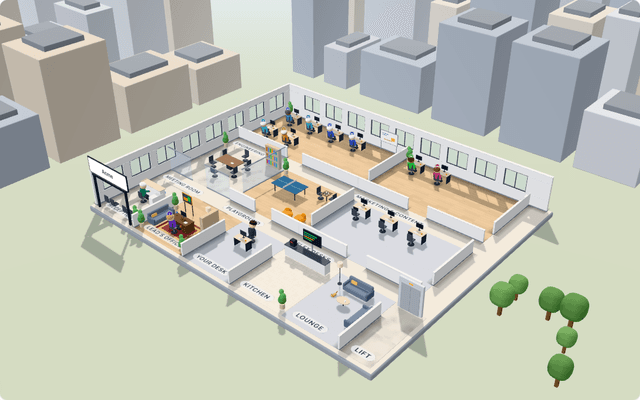
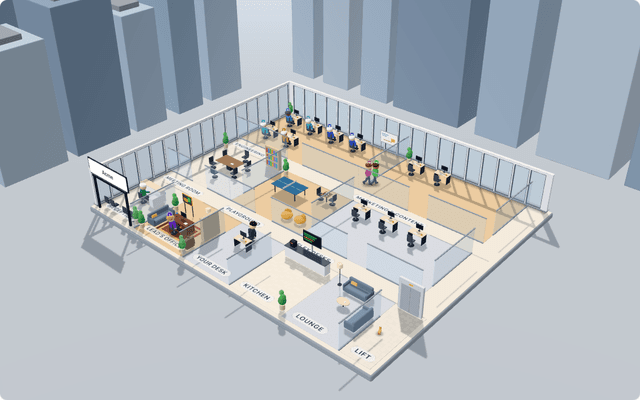
Who is coding, who is in review, who is waiting on you — every teammate at their desk, live. Meetings happen in the meeting room; replay any day to see what happened while you were away.
- Live status on every desk
- Sprint planning & retros, in the room
- Replay any day
- Hand over work in person
You stay in control
Autonomous, not unsupervised
The team does the work; you keep the decisions. Nothing merges, publishes or sends without the guardrails you set.
Never touches main
Agents can’t push. Fastautonomi pushes their branch after checks — never your default branch.
A reviewer that runs the tests
An independent AI reviewer re-runs your tests and records every command it ran.
Approvals for risky actions
Publishing, sending or deleting waits for you — one click to approve or decline.
A budget that holds
Set a monthly AI budget per organization; new work stops before it’s crossed.
Content Writer needs your OK
Publish “How saved carts lift repeat orders” to WordPress
Go on — try the buttons.
Weekly sync
12:04Not using AI? Still for you
A virtual office for your own team
Choose “My own team” and Fastautonomi becomes the place your people work together: projects and sprints, everyone at their desk with a status, and audio and video calls and meetings — right in the office.
- See who’s online, busy or in a meeting
- Call anyone, or schedule a meeting with an “Add to calendar” invite
- Mix people and AI teammates whenever you’re ready
Safe by design
Built to be trusted with your code
The guardrails aren’t settings you have to remember — they’re how the system is built.
Throwaway sandboxes
Code runs in a fresh container per task, destroyed afterwards, behind an egress firewall.
Sealed credentials
Tokens are encrypted at rest (AES-256-GCM) and never handed to the agents.
Your data stays yours
Every organization is strictly isolated; your content is never used to train models.
Pricing
Start free. Grow when the team does.
AI is included — no API keys to bring. Plans include monthly credits; a typical coding task uses about 120.
Free
Try it, or run a small human team
- Trial: 500 credits once
- Up to 3 people
- Projects, backlog and sprints
- Virtual office with calls and meetings
- Pull requests with AI review
Starter
Solo founders and side projects
billed monthly
Choose Starter- Up to 6 AI teammates
- 3,000 credits / month (≈ 25 coding tasks)
- Pull requests with independent AI review
- Project memory that learns from your merges
- 3 people included
Growth
Product teams shipping every week
billed monthly
Choose Growth- The full AI team — up to 3 of each role
- 15,000 credits / month (≈ 120 coding tasks)
- 3 tasks running at once
- Workflows, schedules and approvals
- Product, content and operations teammates
- 10 people included, priority support
Questions
Good questions, straight answers
What exactly does the AI team do?
Each teammate has a job. Engineers pick up a task from your board, change the code in a fresh, isolated copy of your repository, run it, and open a pull request. The Reviewer then checks that pull request independently — it runs the tests itself. Product, content and operations teammates write specs, stories, sprint plans, articles, reports and reminders. You see all of it live in the office and on each task.
Can it push to my main branch or merge on its own?
No. The agents can’t push at all — Fastautonomi pushes their branch after they finish, and never to your default branch. Every change arrives as a pull request for you to merge. Anything risky (deleting things, sending on your behalf) waits for your approval.
Which tools does it work with?
GitHub for code, and your board in Fastautonomi’s built-in projects or in Linear, Jira, GitHub Issues or Superthread. Google Workspace, WordPress and web research are there for the product, content and operations teammates.
Do I need my own AI account or API key?
No. AI is included in the plans as monthly credits, so there’s nothing to set up. You can set a monthly budget, and work stops before it’s crossed.
What is a credit?
Credits measure AI work. A typical coding task uses about 100–150 credits, a chat message about 1, an AI meeting about 2. Your plan’s credits renew every month, and you can top up at any time.
We don’t want AI. Is Fastautonomi still for us?
Yes. Choose “My own team” and you get projects, sprints and the virtual office for your people — with presence, status, audio and video calls and scheduled meetings. No AI anywhere in the menus. The Team plan is per person.
Is my code safe?
Your code is only ever handled inside a throwaway container that is destroyed after the task, behind a firewall that blocks everything except what the task needs. Credentials are encrypted at rest and never handed to the agents. Each organization’s data is strictly isolated from every other.
Can I cancel any time?
Yes. Plans are monthly or yearly; cancel whenever you like and keep access until the end of the period you paid for. Your projects stay yours — ask us any time for a copy of your organization’s data.
Hire your AI team today.
Start free — no card needed. Build your team in two minutes and watch it pick up its first task.